

Settings
Open Settings with the gear in the title bar, beside the window buttons, or press Ctrl+,. It opens in a window over the app, so your downloads stay in view behind it; Escape or the close button closes it. Search settings at the top finds a setting by its name and opens the section it's in.
The ? beside the gear has What’s new, Send feedback…, which opens the project’s issue page in your browser (Apollo Download Manager sends nothing itself), and About Apollo DM, which opens About and diagnostics.
Every change is saved and applies at once; no setting needs a restart. The screen says "Saving…", then "Saved", or why a value was refused, and shows what is saved.
Numbers are saved when you leave the field or press Enter, and brought within their limits.
Reset to defaults asks first, and keeps your download folder.
What this version can't do is shown turned off, with the reason beside it.
The limits of every setting are in the developer documents.
General
| Setting | Default |
|---|---|
| Close to tray: closing the window keeps Apollo Download Manager running in the tray | On |
| Start minimized, in the tray, also when it opens at sign-in | Off |
| Start Apollo Download Manager when I sign in, so queued downloads and seeding carry on after a restart | On for a new install; off if you used an earlier version |
| Confirm before quitting with active downloads | On |
On Linux the tray needs an AppIndicator library. Without a tray, closing the window quits Apollo Download Manager, and it never starts hidden.
Downloads
The download folder: the system's Downloads folder until you choose another.
Sort into categories by file type (on) and A folder for each category (on): see Categories.
Queue and performance
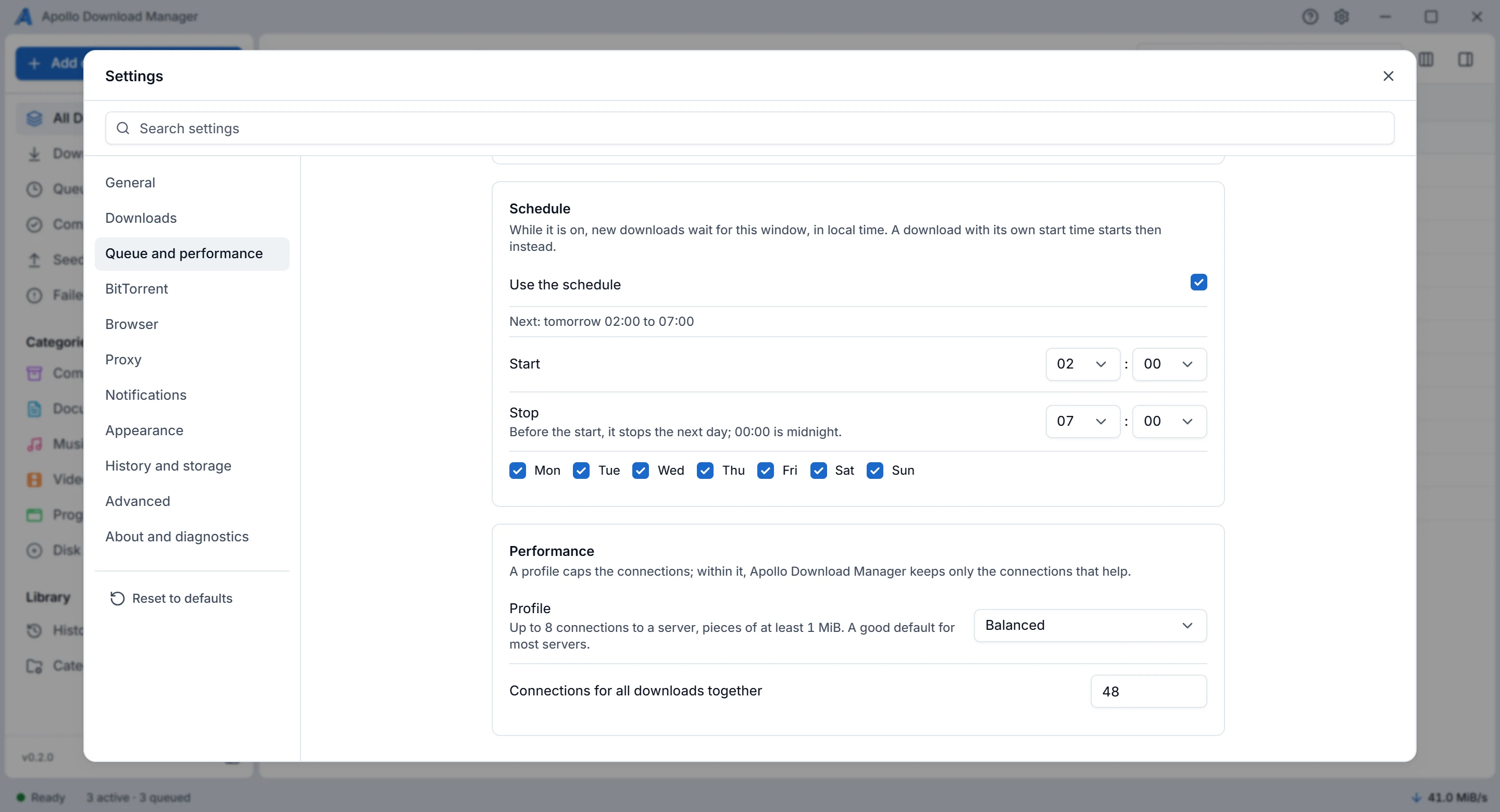
| Setting | Default | What it does |
|---|---|---|
| Simultaneous downloads | 2 | Up to 32. The others wait in the queue. Paused downloads, torrents choosing their files and seeding torrents don't count. Updating from 0.1.x changes a saved 3, the old default, to 2 once; set it again if you want 3 |
| Start new downloads at once | On | Off: new downloads wait in the queue until you start them |
| Restart downloads when the network is back | On | A download that failed because there was no network shows Waiting for network, and continues from where it stopped when Windows or Linux says the network changed. Off: it shows Failed, and you retry it |
| Speed limit for direct downloads | None | For all direct downloads together, in KiB/s. Torrents have their own limit, under BitTorrent (#312) |
| Use the schedule | Off | Downloads you add while it's on run only between a start and a stop time (02:00 to 07:00 by default), on the days you choose; they wait outside it, and the list says when they start, such as Scheduled: tomorrow 02:00. You choose the times with hour and minute boxes, in the app's time format. A stop of 00:00 runs to midnight; a stop before the start runs past midnight. Under the switch, a line says what it does: Next: tomorrow 02:00 to 07:00, Open now, until …, or Off. Downloads already running when you turn it on carry on, and turning it off lets the waiting ones start. If the app was closed when the window opened, its downloads start as soon as it opens inside the window; outside it, they wait for the next one. A download with its own start time starts at that time instead (Downloads) |
| Profile | Balanced | How many connections a download may use, and the smallest piece of a file each connection takes |
| Connections for all downloads together | 48 | Shared fairly between the running downloads |
The profiles:
| Profile | Connections to one server | Smallest piece |
|---|---|---|
| Conservative | 2 | 20 MiB |
| Balanced | 8 | 1 MiB |
| Maximum | 16 | 1 MiB |
| Custom | 1 to 16, your choice | 1 to 1024 MiB, your choice |
A profile sets the most a download may use. Within it, Apollo Download Manager starts with all of those connections and keeps only those that make the download faster, so a server that gains nothing from more gets fewer. More than 8 connections helps only a server that limits each connection's speed. A lower limit applies to running downloads at once; the smallest piece applies to downloads that start after the change.
BitTorrent
| Setting | Default |
|---|---|
| BitTorrent: off refuses torrents and magnet links | On |
| DHT, Peer exchange | On |
| Local peer discovery | Off |
| Peers per torrent | 55 |
| Torrents seeding at once | 0: no limit |
| Upload and download limits for all torrents | None |
| Extra trackers, added to every new torrent except private ones | None |
| DHT bootstrap nodes | libtorrent's own |
| Listening port (0 for any) | 6890 |
| Ask the router to forward the port (UPnP, NAT-PMP) | Off |
| New torrents: Choose files of magnet links before downloading | Off |
| New torrents: Seeding after download | Don’t seed |
| New torrents: Upload limit for each new torrent (KiB/s, 0 for none) | 0: none |
If the listening port is taken, Apollo Download Manager uses the next free one, and the screen says which. With port mapping on, it shows whether the router answered and which port it forwarded.
Browser
Take links from the browser and Ask before adding, both on, and the browsers to register. See Browser integration.
Proxy
For networks, such as a company's or a school's, that require one. Only this proxy is used: the proxy settings of Windows, Linux or the environment never are.
Type: No proxy, HTTP, HTTPS or SOCKS5. Fill in Host (a name or an IP address, without
http://or a port) and Port (8080 at first) first, then choose the type; a type without a host isn't saved, and the screen says why.Proxy login, only for a proxy that asks for one: the User name, then the Password with Save password. The password is never shown again: the screen says only "A password is set." or "No password is set.", and Clear removes it. It is sent to the proxy alone, never to a site you download from.
Remember the password in the system keychain is off at first. Off, Apollo Download Manager asks for the password again after it restarts. On, it is kept in Windows Credential Manager or the Linux keyring.
What goes through it: HTTP, HTTPS, FTP and SFTP downloads that start, resume or are retried after the change, and torrents at once.
SFTP and torrents can't use an HTTPS proxy. An SFTP download then fails saying so, and torrents don't start. Choose an HTTP or SOCKS5 proxy for them.
Torrents through a proxy don't look for peers on the local network or map a port, and use the DHT only through a SOCKS5 proxy, so nothing goes around the proxy. They may find fewer peers.
Notifications
| Notify when | Default |
|---|---|
| A download completes (also when a torrent starts seeding, or waits for its files to be chosen) | On |
| A download fails | On |
| A download starts | Off |
| An engine stops and won't start again | On |
Appearance
The theme (follow the system, light or dark), the list's density (compact or comfortable), and the time format: 24-hour (14:30), the default, or 12-hour (2:30 PM). The time format applies to every time the app shows, the schedule and start times included. The panel widths and the list's columns are kept as you leave them.
History and storage
Keep history for 90 days (0 keeps entries forever), and at most 10,000 entries; the oldest go first. Forgetting an entry never touches a file, and a download still in the list is never forgotten.
Advanced
Metalink: off by default, as in V1. On, links to Metalink files add the files they describe (Protocols and limits).
User agent: what Apollo Download Manager tells servers it is,
ApolloDownloadManager/<version>by default. For downloads added after a change.Retries and timeouts, for downloads that start or retry after a change:
Setting Default Failures in a row before giving up 5 Longest wait before a retry 60 s Times a failed download starts again 2; after a lost network connection, Apollo Download Manager keeps trying for up to 5 minutes, keeping what it downloaded Shown as stalled after 15 s without data, or with less than 1 KiB/s A request starts again after 30 s without data, or with less than 1 KiB/s; never while a speed limit slows it Connect timeout 30 s Disk: Preallocation (sparse by default; full reserves the whole file at the start, so a disk too small fails at once) and the write buffer per connection (2 MiB).
Servers: Apollo Download Manager remembers how many connections each server allowed, so later downloads from it start at the right pace. It keeps this on your computer for 7 days and never exports it. Forget servers clears it at once.
About and diagnostics
The versions of Apollo Download Manager and its engines, what the download engine supports, the recent log, Export diagnostics…, and restarting the transfer engine or the torrent helper. See Troubleshooting.